
Today, I want to talk about an opportunity I found very useful for schools during this corona virus pandemic.
It’s obviously no news anymore that school have been forced to shut down activities due to the covid-19 pandemic in the world.
Most African students are forced to wait till the end of this crisis to go back to learning.
While a few schools have found alternative ways to continue learning online. Most schools are still struggling to find a way out and even contemplating sitting it out till the pandemic is over.
This is attributed to a lot of reasons financial, psychological and even personal reasons.
But the major reason behind this thinking from schools is MONEY.
Most of this schools are skeptical about investing money in building a platform which will likely be a temporal solution, some just can’t afford to invest millions or even hundreds of thousands to build such a learning system.
Well, I have found that Google has a solution for schools to manage learning online for it’s students and this is absolutely FREE. Yes, it’s absolutely free but maybe not so easy to set up but it’s absolutely free.
Unlike most schools who are currently investing hundreds of thousands or even millions to setup their own online learning platforms (well, they do have the money so it’s not a bad idea to have a personal learning platform), mid and low level schools can use this FREE Google classroom to continue their learning.
Some of the features of Google classroom are:
Add students easily
Students can join a class with a code, giving you more time to teach.

Teach together
Co-teach a course with up to 20 other instructors.

Grade quickly and easily
Sort students, see who’s turned in work, add feedback, draft grades to share later, or return graded work to all students with a click. Plus, add annotations and visual feedback to student work in the Classroom mobile app.

Manage multiple classes
Reuse existing announcements, assignments, or questions from another class. Share posts across multiple classes, and archive classes for future reference.
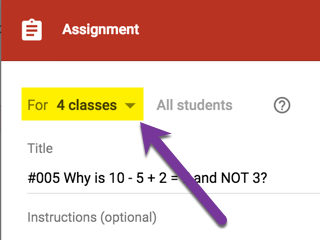
Enrich assignments
Add materials to your assignments, such as YouTube videos, a Google Forms survey, PDFs, and other items from Google Drive. Teachers and students can highlight, notate, and draw on documents and PDFs in the Classroom mobile app.

Transfer grades
Export final grades to Google Sheets or to a CSV file for upload elsewhere. You can also push grades directly from Classroom to your student information system (SIS)

Other Features include:
One-click worksheets—Attach a worksheet to an assignment and create a copy for each student with a click.
Customize assignments—Add grade categories, due dates, point values, and topics to the assignments you create.
Individual assignments—Teachers can post work and announcements to individual students in a class.
Prepare in advance—Draft announcements, assignments, and questions, or schedule them to post at a certain time.
Quick exit-tickets and polling—Post a question to students, then view results within Classroom.
Customize your class graphics—Change the default color or theme for your class.
Keep resources in one place—Create a topic for key resources, so students can always access materials, such as a sign-up sheet for office hours, a class syllabus, or an online text.
Keep students organized—Classroom creates a Google Calendar for each class and updates the calendar with work and due dates. Students can also view upcoming work with a click.
Keep teachers organized—Review student work, including assignments, questions, grades, and previous comments. View work by one or all classes, and sort by what needs reviewing.
Access anytime, anywhere—Access Classroom 24/7 on the web or via the Android and iOS Classroom mobile apps.
Real-time feedback—View, comment, and edit student work in real time in the Docs grading tool. Annotate student work in the Classroom mobile app.
Create class discussions—On the Stream page, post announcements, engage students in question-driven discussions, encourage them to reply to classmates, and move important topics to the top.
Manage class discussions—Control who can post to the Stream page, and mute individual students from posting or commenting.
Share content—Share links, videos, and images from websites to Classroom with one click in the Share to Classroom extension.
Push content to students’ screens—Push websites instantly to a class with the Share to Classroom extension. Students can also share their screen with their teacher.
Communicate with guardians—Teachers in any G Suite domain can invite parents and guardians to sign up for email summaries that include a student’s upcoming or missing work.
Keep classes organized—Teachers can organize the Classwork page by creating topics that can be easily reordered.
Because setting up Google classroom for schools is not entirely straight forward, I am going to be providing FREE Google classroom set up for just 2 schools.
Others schools interested in setting up this FREE Google Classroom can reach me on WhatsApp or email me at daniel@danielolawuyi.com.
If you want to be part of the first 2 schools who will be getting this setup free, then send me a message right now.

Who am I?
Hello! I’m Daniel Olawuyi.
Founder DMZ Tech (Digital Media and Technology Zone)
A Senior Web Designer & Developer. Experienced with all stages of the development cycle for dynamic web projects.
An experienced Computer Engineer skilled with managing hardware and software related isssues.
A professional digital entrepreneur with few years experience managing digital and social platforms.
Check out my page at www.danielolawuyi.com to know more about me.